



All Activity
- Earlier
-
 johnmartinez2 joined the community
 -
 Death Queen joined the community
 -
 Gabz | POP's Diner NTeam Development | TUNNEL / CONNECTION / BRIDGE V2 / TUNNEL PALETO Paleto Bay House 3 MLO FiveM Interior – Fivem Dealership Lighthouse MLO FiveM Interior for Servers – Fivem Dealership Paleto Bay Mansion Map for FiveM RP Servers – Fivem Dealership Gabz | Bahama Mamas Gabz | Lost MC Gabz | Paleto Camp Gabz | Park Ranger Energy Shop · LS TUNNEL Energy Shop · Los Santos Medical Center Energy Shop · Mount Zonah Medical Center Energy Shop · Eclipse Police DP Energy Shop · Motoclub Energy Shop · O'Neil Ranch Energy Shop · Galaxy NightClub Energy Shop · La Fuente Blanca Energy Shop · Stores Energy Shop · Upturn Nightclub Energy Shop · Ocean Police Department Free Hood Extension Davis Neighbourhoods South Central Los Angeless Midnight Saints Raceway A&R Market East Los Santos V2 Fiv3Devs | Vespucci Beach Fiv3Devs | Pillbox Hospital Fiv3Devs | X-Stream Fiv3Devs | Pawnshop Fiv3Devs | Black Market Fiv3Devs | Bahama Mamas Add-on Fiv3Devs | Tequi-la-la Add-on Fiv3Devs | Sheldon Mansion
 -
Product in Civilian Vehicles/Assets
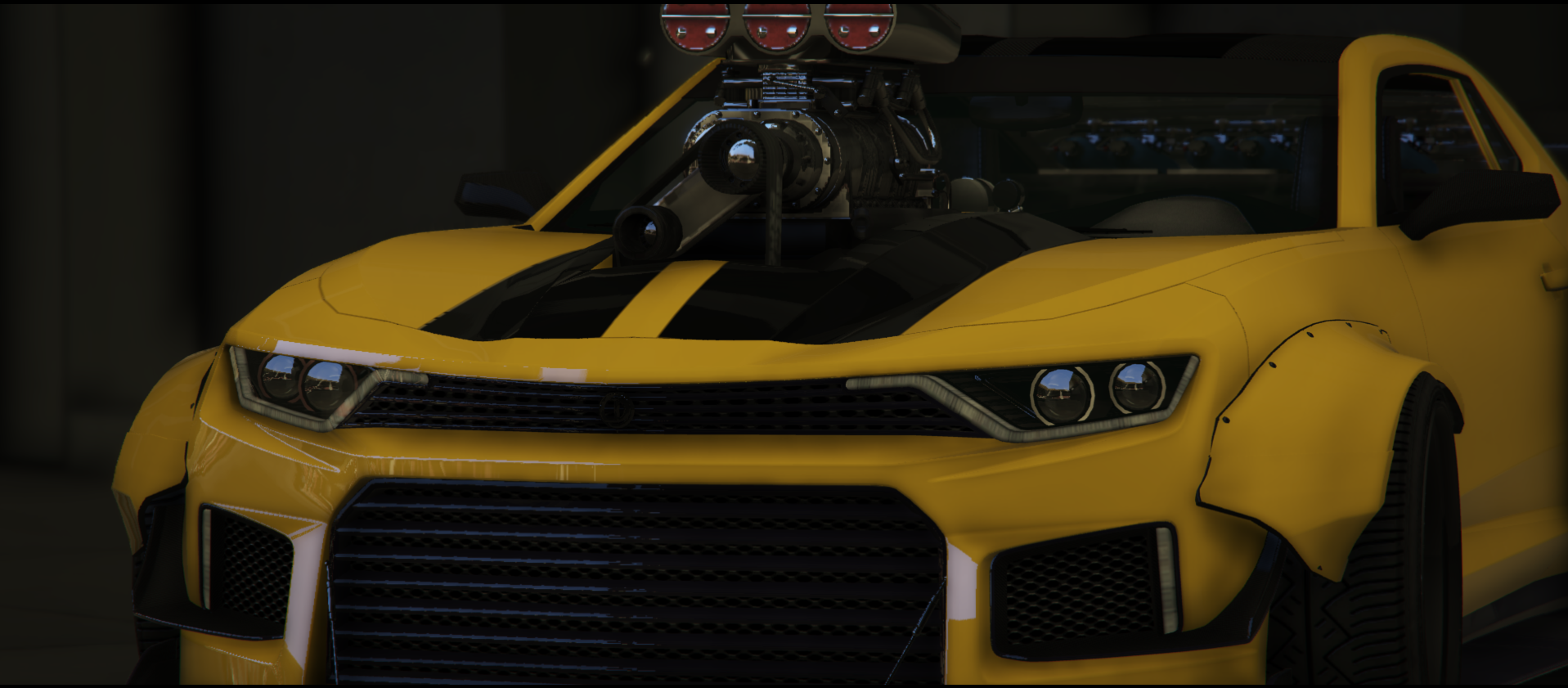
Want to relive your childhood of the Transformers? This Lore-Friendly Camaro does just that! Introducing the Vigero Custom Widebody! You can modify this vehicle a lot via our in-game "Mods Menu" in vMenu! This vehicle has a moving suspension system! With speed, you go higher, you sit on the floor when stationary!
You can access this vehicle via /donator in chat (once you've claimed your roles)
All vehicles sold on this store come with the same disclaimer;
If items of this package are used to violate the server rules of Southside Roleplay Community (of where the package is utilized), said package can be removed by the executive team with no chance of refunds.
We hold true to our No Refunds policy. All income/earnings made from this store front are put back into the server.
$23.25 -
Product in Civilian Vehicles/Assets
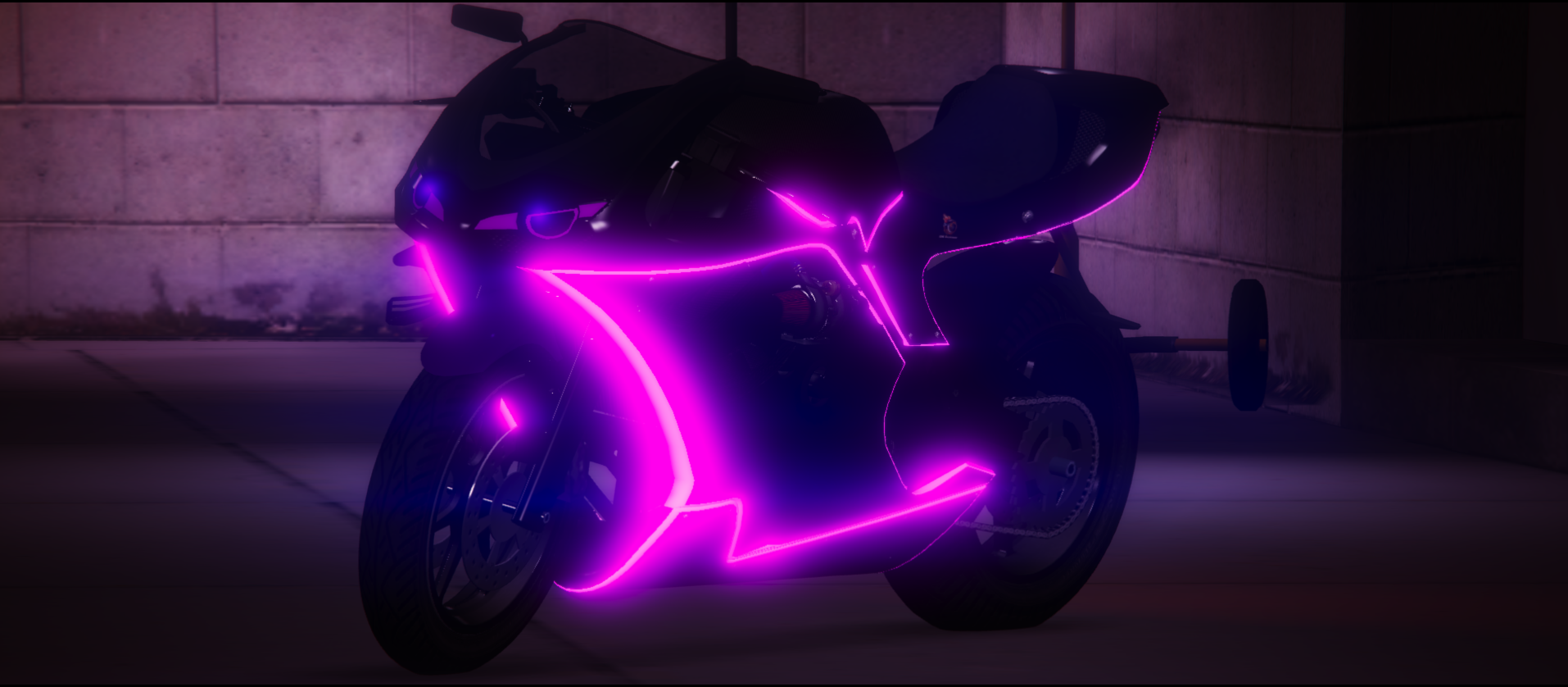
Want the Lore-Friendly equivalent of a Kawasaki Ninja H2R? Well this bike is for you! This bike is heavily modified to allow for crazy bodywork. The bike comes with LED Light Strips, the "Glowing Ribcage" look with Glowing Tubes & Carbon Fiber bodywork. If you prefer bikes over cars, this bike is 100% the bike for you! Not only is it fast, it's fashion!
This vehicle features a Twin-Turbo & Body Kit with toggleable options via Vehicle Related Options in vMenu.
All vehicles sold on this store come with the same disclaimer;
If items of this package are used to violate the server rules of Southside Roleplay Community (of where the package is utilized), said package can be removed by the executive team with no chance of refunds.
We hold true to our No Refunds policy. All income/earnings made from this store front are put back into the server.
$27.32 -
 Crocco501 joined the community
 -
When the server gets between 200-300 pepole to create the first fedral department, under the DOHS there it will be: -NOOSE for the tatical division -HSI it would be the investigation unit -Secret Service as security for high ranking offical -FEMA as emergency response Then the main DOHS will be allow to protect Airports or naval ports but if AOP is LS aslo to patrol the street as aid to local LEO and they will have prior on Federal relete scene. I (Crocco) would propose my self as the director of it thanks to my past expirince in other servers where i was: -SGT in SANG -MP supervisor -TRU supervisor -Ex voast guard 02 -ONI supervisor -FIB senior agent -HRT supervisor -NSB command -Lt in BCSO -VICE 01 -SRT supervisor -K9 supervisor -Game warden command -SCP supervisor Thanks to all my expirince i would be able to create documents/SOP/Rosters for the department then aslo to be active and host tranings This is my suggestion
-
 Lilmanseth931 joined the community
 -

-
 Allow the executives to hand out an office key for their office so they don't have to drag their friends when they want them in their office. When executives dont want people with keys to join they can change the status. And if they join when the status says dont join or whatever they lose their key access. No matter what and cannot get it back for 2 weeks.
 -
Addition: Please read the FAQ in the Southside Roleplay discord server before making any suggestions. Discord: https://discord.gg/southsideroleplay Thank you for taking the time to play Southside Roleplay & We hope that your suggestion will help enhance our server!
-
Dear John, We won't be adding this at the moment, but that doesn't mean we won't consider it in the future. Please be patient with our team. We will get back to you if this is being added. Thank you, Director of Affairs, Jasper Mosley.
-
 Would be cool if you could rappel out of helicopters. I would recommend having it on SWAT Helicopters and search and rescue helicopters, as that’s where you would need to rappel out of for tactical rescue or missions.
 -
Regarding the SWAT vest, We are going to have to decline, Dean won't be adding custom assets from someone who is not a trusted developer. Please wait for a bit, and work with what you have, and you will get a new EUP later. Any other questions can be answered via a staff ticket in the Discord server. Best Regards, Director of Affairs, Jasper Mosley.
-
This honestly seems more due to the fact we don't HAVE a rappel script. If you could please include the spawncode I'll look into it. Thanks, Dean.
-
Read the FAQ before making a suggestion. This suggestion has been locked.
-
A quote from Dean. "I will find where you live 😒... No." Signed, Director of Affairs, Jasper Mosley.
-
 Can we please add a cad in our server, i would like to have one thats in game and not like Sonoran cad because that shit is ass. I think that if you add a cad system it will bring better rp on cops side and on civ sides because now cops will be able to keep track of records and civs would have a more realistic reason to run if they had something in their cad that we saw. If possible please look into LB cad system.
 -
I was just wondering if we could get new swat vest, I know you spent A LONG TIME on the EUP dean but I have someone who makes EUP and he said he would make swat vest for me and I have a really good idea on the vest and I just wanted to see if you would let it happen sometime next month Thanks! Blake Simpson
-
When you rappel our of the helicopter you just fall out and die. https://medal.tv/games/gta-v/clips/lTwNwr4nZyz8RP1Mw?invite=cr-MSxweHIsMjMwNjY4NDA1&v=6
-
Hey John! Thank you for the report! The answer to your question is below this text! To fix this issue, at the moment holding the button should work. If that doesn't work, please get back to us! Thank you! Director of Affairs, Jasper Mosley.
-
Jasper M. changed their profile photo
-
Damo H. changed their profile photo
-
 Jay changed their profile photo
 -
Hi Damo, This will be implemented when we do the refurbishment on the Fire Scripts & Toolboxes later this month. Thank you for your suggestion! Dean SantiagoCommunity Director @ Southside Roleplay
-
Hi alex, For the first suggestion, we already have a Tower Ladder Truck (unfortunately it's generic) and it can be found as the "Mid-Mount Ladder" truck on your SAFR Department Roster. As for the 2nd Suggestion, We've taken a break from EUP work for the next couple weeks (aside from required work) to evaluate the performance of the server for new & returning players. Lastly, we're working with Zea Developments to bring an updated Zones system for fire calls that generates random calls based on locations on the map. With the revamp we've done in Sandy Shores, we're planning to add a lot of new fire opportunities across Sandy Shores & Blaine County. As of right now, we're working to fix the bookduty command as it has not been generating fires in the correct places or functioning as expected. Thank you for your suggestion! Dean SantiagoCommunity Director @ Southside Roleplay
-
We've taken the time to review this suggestion. At this time, we'll be implementing a script like this or similar to the main server to enhance the roleplay for you! Thank you for your suggestion! Dean SantiagoCommunity Director @ Southside Roleplay
-
-
 Pierce Velocity Tower Ladder truck Wildland Firefighting Packs (backpacks essentially but specifically for firefighting) Bookduty calls for sandy/blaine county
 -
Alex M. joined the community
-
 riley joined the community
 -
John Davis joined the community
-
When you use M menu to drag people as LEO, it drops them automatically right after dragging them
-
 it would be nice to have a scene script to enhance the roleplay on are server i found two which i would be nice https://www.lcpdfr.com/downloads/dev-resources/fivem/50895-nd_scenes-made-by-nightz-development/ https://forum.cfx.re/t/dpscenes-1-0-world-scenes-notes-standalone/2216847
 -
 max_libertatem joined the community
 -